

How to Update Etsy Listings from Shopify (2026 Step-by-Step)

Updated: Aug 4
⚠️ Important Note on Variations Updates: Running a bulk update on SKUs will mirror your Shopify setup exactly. If new SKUs have been added to Shopify, they will automatically be added to Etsy. If SKUs have been removed from Shopify, they will be permanently removed from Etsy. This action cannot be reverted.
🛠️ Phase 1: The Perfect Match
Before you can sync, the app needs to know which Shopify product belongs to which Etsy listing.
Enter the App: Open your dashboard and navigate to the Bulk Update page found in the left-hand menu.

Trigger the Scan: Click the button labeled "Refresh listings & suggest Matches."
The Scan: The app will automatically scan the SKUs on both Shopify and Etsy and go over export listings sync history logs. It will then highlight suggested matches based on those identifiers.
Filter Products - you can filter based on Shopify's title, listing ID and SKUs.

Click on the + icon to add the suggested listing

🛠️ Phase 2: Updating Your Content
Once your products are matched, you can choose between a "surgical" single update or a "massive" bulk sync.
Option A: Update a Single Listing
Best for testing a new SEO strategy or tweaking a specific item.
Link: Click the Link icon to officially link the two listings. (If a SKU suggestion is available, you can add it here).
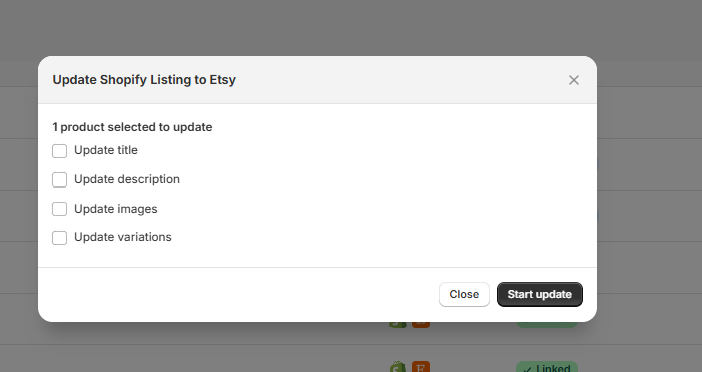
Sync: Click Update and select which specific attribute you want to push to Etsy: Title , Description , Images and Variations.
Option B: Bulk Update Multiple Listings
Best for store-wide rebrands or seasonal updates.
Select: Use the checkboxes on the left side of the table to select all the listings you want to modify.
Batch Action: Click the Update button located at the top right of the table.
Choose & Go: Select either Title , Description or Images to trigger a simultaneous update across all selected items.
📈 Phase 3: Tracking Your Progress
You don't have to guess if it worked. The system provides real-time feedback.
The Progress Bar: As soon as you hit update, a bar will appear at the top to show the sync status.
The History Log: For a detailed breakdown, head to the Sync History tab.
✅ Green Check: Success! Your Etsy listing is now perfectly mirrored with Shopify.
❌ Red Sign: An error occurred. Pro-tip: Don't panic—simply click the error message to see exactly what Etsy's API rejected so you can fix it in seconds.
💡 Pro Tips for 2026 Efficiency
💰 About Price Updates: You can currently update prices using the Export Listings Wizard. Just remember: price updates are tied to SKUs, not Listing IDs. Keep your SKU naming convention consistent to avoid errors. Read how to update price here


Comments